Compatible with and can be included in C++ or Objective-C projects.
A small, easy to use Open Source Database Connection Pool Library with the following features:
Requirements: Runs on iOS, Linux, macOS, FreeBSD, Solaris, OpenBSD and other POSIX systems. A C11 compiler is required to build the library.
Compatible with and can be included in C++ or Objective-C projects.
Modern, Object Oriented API design. Fully documented.
The library is licensed under a Free Open Source Software License.
Used in M/Monit
- The M/Monit Team mmonit.comUsed in DBMail
dbmail.orgYes, libzdb can be used from and included in any C, C++ or Objective-C project. The Xcode project file used to develop libzdb is available from the repository and can be included in your own Xcode project.
Libzdb is thread-safe and designed to be used in a multi-threaded program.
Yes, the pool can be setup to dynamically change the number of Connections in the pool depending on the load.
Of course, libzdb is the perfect glue layer between different database systems or databases. For instance, you can read data from MySQL and write to PostgresSQL in just a few lines of code
The project is hosted at Bitbucket. Click the r icon in the footer below to visit
Libzdb currently supports SQLite, MySQL, PostgreSQL and Oracle. At the moment there are no plans to support additional database systems.
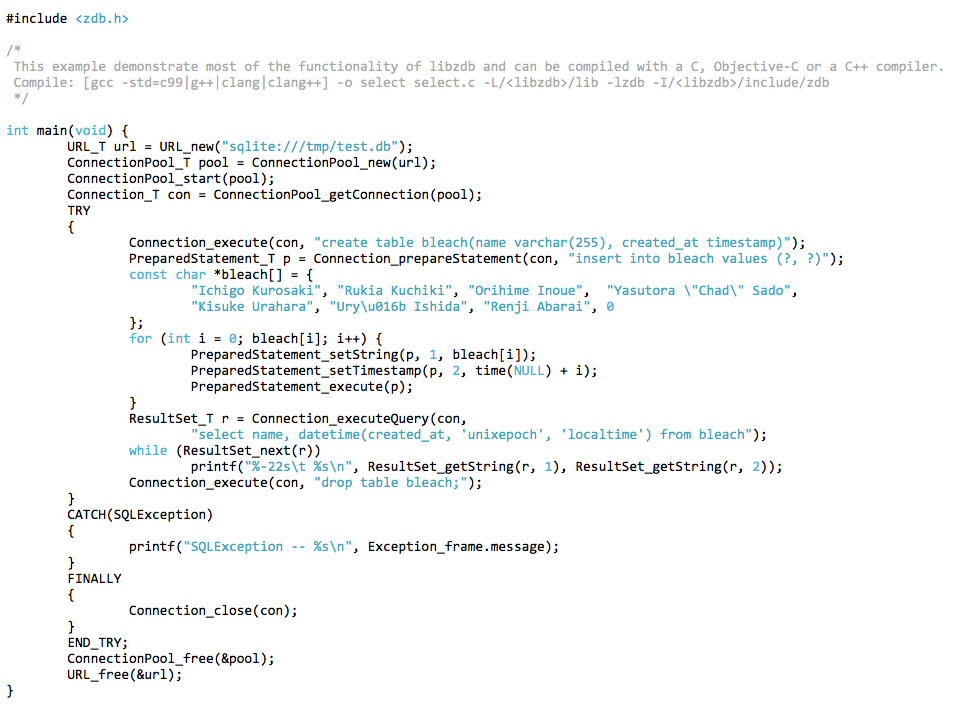
To use libzdb in your C project (C11 or later), include zdb.h:
#include <zdb.h>
Start by reading the documentation for the Connection Pool.
You can also view the API file list here. Each C module is thoroughly documented with example code.
Refer to the section below for information on the Connection URL used to establish a database connection.
To use libzdb in your C++ project (C++20 or later), import zdbpp.h and use the namespace zdb:
#include <zdbpp.h>
using namespace zdb;
Begin with the introduction to libzdb for C++. At the end of that page, you’ll find an overview of the classes in the library.
You can also view the namespace class list here. Each class is thoroughly documented with example code.
The URL given to a Connection Pool at creation time specify a database connection on the standard URL format. The format of the connection URL is defined as:
database://[user:password@][host][:port]/database[?name=value][&name=value]...
The property names user and password are always recognized and specify how to login to the database. Other properties depends on the database server in question. User name and password can alternatively be specified in the auth-part of the URL. If port number is omitted, the default port number for the database server is used. Reserved characters used in the Connection URL must be URL encoded.
Here is an example on how to connect to a MySQL database server:
mysql://localhost:3306/test?user=root&password=swordfish
In this case the username, root and password, swordfish are specified as properties to the URL. An alternative is to use the auth-part of the URL to specify authentication information:
mysql://root:swordfish@localhost:3306/test
See mysql options for all properties that can be set for a mysql connection URL.
For a SQLite database the connection URL should simply specify a database file, since a SQLite database is just a file in the filesystem. SQLite uses pragma commands for performance tuning and other special purpose database commands. Pragma syntax on the form, name=value can be added as properties to the URL and will be set when the Connection is created. In addition to pragmas, the following properties are supported:
An URL for connecting to a SQLite database might look like:
sqlite:///var/sqlite/test.db?synchronous=normal&foreign_keys=on&journal_mode=wal&temp_store=memory
The URL for connecting to a PostgreSQL database server might look like:
postgresql://localhost:5432/test?user=root&password=swordfish
As with the MySQL URL, the username and password are specified as properties to the URL. Likewise, the auth-part of the URL can be used instead to specify the username and the password:
postgresql://root:swordfish@localhost/test?use-ssl=true
In this example we have also omitted the port number to the server, in which case the default port number, 5432, for PostgreSQL is used. In addition we have added an extra parameter to the URL, so connection to the server is done over a secure SSL connection.
See postgresql options for all properties that can be set for a postgresql connection URL.
The URL for connecting to an Oracle database server might look like:
oracle://localhost:1521/servicename?user=scott&password=tiger
Instead of a database name, Oracle uses a service name. The information in the url above is typically specified in a tnsnames.ora
configuration file, pointed to by the environment variable TNS_ADMIN. In the example below, instead of host, port and service name, we use a tnsname
as defined in tnsnames.ora. We also use the auth-part of the URL to specify the username and the password. Finally, we specify that we
want to connect to Oracle with the SYSDBA role.
oracle://sys:secret@/tnsname?sysdba=true
See oracle options for all properties that can be set for an oracle connection URL.
Libzdb allows you to create multiple ConnectionPool objects, each connecting to different database systems as needed. This makes libzdb an excellent tool for querying, copying, and moving data between various database systems and instances.
The example below demonstrates this capability by copying data from a MySQL database to a PostgreSQL database. While simplified, it illustrates how libzdb can effectively serve as a connecting layer between your different databases.
try {
    // Start a ConnectionPool to the Apples Warehouse Database
    ConnectionPool apple_store("mysql://root:fruit@192.168.1.101:3306/apples");
    apple_store.start();

    // Start a ConnectionPool to the Oranges Warehouse Database
    ConnectionPool orange_store("postgresql://root:ninja@192.168.5.210/oranges");
    orange_store.start();

    // Get a Connection to the Orange store
    Connection orange_connection = orange_store.getConnection();

    // Select Apples we want to copy to Oranges
    Connection apple_connection = apple_store.getConnection();
    ResultSet apples = apple_connection.executeQuery(
        "SELECT name, color, weight FROM apples"
    );

    // Create a Prepared statement for storing Oranges
    PreparedStatement orange = orange_connection.prepareStatement(
        "INSERT INTO oranges (name, color, weight) VALUES (?, ?, ?)"
    );

    // Copy all Apples to Oranges under a transaction
    try {
        orange_connection.beginTransaction();
        while (apples.next()) {
            orange.bindValues(
                apples.getString("name").value_or(""),
                apples.getString("color").value_or(""),
                apples.getDouble("weight")
            );
            orange.execute();
        }
        orange_connection.commit();
        std::cout << "Transfer successful" << std::endl;
    } catch (const sql_exception& e) {
        orange_connection.rollback();
        std::cerr << "Transfer failed: " << e.what() << std::endl;
    }

    // Connections are automatically returned to their respective pools when
    // they go out of scope
} catch (const sql_exception& e) {
    std::cerr << "Database error: " << e.what() << std::endl;
}
CONNECTIONPOOL_TYPE and ConnectionPool_getType() function to identify the database type that the ConnectionPool is connected to (MySQL, PostgreSQL, SQLite, etc.).ssl-cert - SSL client certificate file pathssl-ca - Certificate Authority (CA) certificate file pathssl-key - SSL client private key file pathmysql://user:pass@host/db?use-ssl=true&ssl-cert=/path/to/cert.pem&ssl-ca=/path/to/ca.pem&ssl-key=/path/to/key.pemheap_limit as a special URL parameter for SQLite connections. This change aligns with SQLite's introduction of the soft_heap_limit pragma alongside hard_heap_limit in SQLite version 3.7.3. Users should now use the standard SQLite pragma syntax instead. See SQLite pragma documentation for details.const char* host = valueOr(URL_getHost(url), "localhost");If you have questions or comments about the software or documentation please subscribe to the libzdb general mailing list and post your questions there.
Libzdb is open source. It's hosted, developed, and maintained on Bitbucket.
If you believe you have found a bug, please use the issue tracker to report the problem. Remember to include the necessary information that will enable us to understand and reproduce this problem.

Copyright © 2026 Tildeslash Ltd. All Rights Reserved.